There was a problem loading the comments.

..Vertical Grading Editor (VGE) - Import and Export vertical design..

Support Portal  »  Knowledgebase  »  Viewing Article

  Print

Where have the Import and Export Vertical Curve options gone in Civil Site Design?


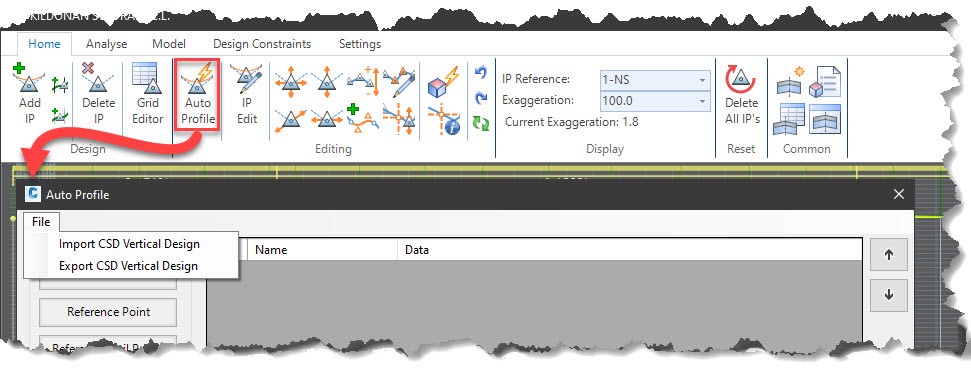
The options still remain in the Auto Profile tool within the Vertical Grading Editor (VGE)
Process to Export:

  1. Open the Vertical Grading Editor for the desired road
  2. Click on Auto Profile
  3. When the Auto Profile window appears, click on File to expose the Import CSD Vertical Design and Export CSD Vertical Design options
 

0a046a00ae2f4d1c954fd40937b23188d5047d7051ad58313487d53a773228aeac1bacc33af7efc4?t=c2158132b7e2b2770387d0ed07ea8493


Attachments


Share via

Related Articles


Self-Hosted Help Desk Software by SupportPal
© Civil Survey Applications