Civil Site Design and Large Models
Civil Site Design is very efficient Survey and Design software and can model large areas. By default, the software updates every String as you make changes in the Vertical Grading Editor (VGE), after you have edited a design IP/PVI. The Models are updated and displayed in the Cross Section Viewer (CSV), the Plan View as well as the Model Viewer.
This dynamic behaviour on large models can result in a delay in the VGE window after you have made an edit. There are tools in the software to stop automatic updating, so there are no delays while editing the vertical design. Automatic Updates can be suppressed while you have a VGE window open, or you can opt to disable automatic Model and Surface updates so they will only update when you are ready.
Accessing the Performance Settings form
The Performance Settings (Advanced Rebuild Settings) form enables changes to the automated processes and can be accessed from multiple locations. You can directly open the form from the dedicated ribbon command: Roads tab > Active Drawing dropdown > Rebuild Settings
Otherwise, the command can be run from other forms:
Roads tab > Active Drawing dropdown > Active Drawing Settings, then Miscellaneous Tab > Advanced Settings button
Roads tab > Modelling Panel > Toggle Display command, then Extra Tab > Performance Settings button
Vertical Grading Editor Window > Settings tab > Settings button, then Performance Settings button
Options to Improve Performance
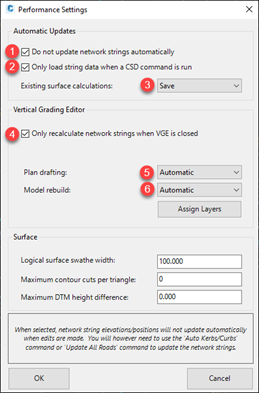
The Performance Settings Form provides access to a variety of controls to facilitate a faster design experience:
- Automatic Updates:
- Toggle on to disable the update of network strings (such as Roads, Kerb Returns and Cul-de-sacs etc.) updating when edits are made. If toggled on, you will need to run the Update all Road Objectscommand to update the Road and Network strings.
- Toggle on the second option to stop Civil Site Design from loading when the drawing is opened. This makes drawing opening/switching faster, but the design information will not update until a Civil Site Design command is run.
- Set to Save the Existing Surface Calculations. If set to Redo, sections are calculated when Civil Site Design is started in a drawing. When set to Save, the information is saved to the data folder for faster recall and load.
- Vertical Grading Editor:
- Toggle on to Only Recalculate Network Strings when VGE is Closed. When toggled on, models, surfaces and linework will only be updated a Vertical Grading Editor (VGE) window is closed. This will reduce wait times while editing in the VGE window.
- Toggle Plan Drafting to Manual to stop design linework being recreated on every edit in the VGE window. This typically has only a small impact on speed. If set to Manual, you will need to run the Update all Road Objects command to update the Road and Network strings.
- Model Rebuilding can be toggled to Manual to stop models (surfaces) from being updated during editing of the design in the VGE window. If set to Manual, you will need to run the Update all Road Objects command to update the Road and Network strings.
How to Manually Update
When disabling some of the automated rebuild functionality to increase performance, you will need to intermittently refresh your data manually. Here are some of the manual rebuild commands:
Update All Road Objects.
- Run the ribbon command Roads Tab > Edit Panel > Update all Road Objects
Updates the Road Objects after an edit to a Road Network String such as a Road, Kerb Return, Cul-de-sac, Knuckle or Roundabout.
Rebuild Models.
- Run the ribbon command Roads Tab > Modelling Panel > Rebuild Models
Updates the Models in your project including the line work and Surfaces of Models that have both Road and non-Road (Profile) Strings.
Model Viewer Performance Enhancements
When Model Viewer is started, or updates following a design change, it will recalculate all models as well as update the trimming of the Base Surface to show all added design surfaces. You can improve the speed and control updating of Model Viewer by doing the following inside Model Viewer:
- Disabling (Toggling Off) the Model Viewer > Home Tab > Auto Update option. The Model Viewer is Modeless and updates in real time as models are rebuilt. This toggle allows users to make numerous edits and then click to Refresh Model (or press [ctrl]+[r+]) to update Model Viewer.
- Clicking on the Model Viewer’s Fastdraw button at the bottom of the form to cache the Base Surface (setting the Trim boundaries and Line Marking as static). This is a toggle, so clicking again will turn off Fast Draw. After turning off Fast Draw, click on the Refresh Model button to update Model Viewer
- Turning off the display of Objects, Cut-outs and Extrusions via the Objects tab > Display panel.
- Turning off labels via the Home tab > Viewer Settings command, then unticking the Tooltips tab > Show Tooltips toggle.
Updating Civil 3D Profiles
Civil 3D users have two options for automating output to Civil 3D objects:
- Civil 3D Surfaces
-
- In the Active Drawing Settings form (accessed from the Roads tab > Active Drawing dropdown > Active Drawing Settings), click on the Modelling tab to see the C3D Settings Options. Untick the option ‘Build ALL surfaces as C3D surfaces’ to stop an automatic rebuild of Civil 3D surfaces whenever the design is changed. If this option is unticked, the Civil 3D Surfaces command can be used to push an export/update to Civil 3D surfaces
- Civil 3D Profiles and Profile Views
-
- In the Active Drawing Settings form (accessed from the Roads tab > Active Drawing dropdown > Active Drawing Settings), click on the Vertical Grading Editor tab to see the Civil 3D Profiles- Levels Updating. Untick the option ‘update all Civil 3D Profiles when a Profile Editor is closed’ to stop automatic rebuild of Civil 3D profiles (and updating of profile views) whenever a Vertical Grading Editor window is closed. This will make a big difference to performance as the project size increases. If this option is unticked, the Create/update Civil 3D Profiles command can be used to push an update of all Civil 3D profiles and profile views.